WHAT'S NEW?
Loading...
History is the study of the past. It is a chronological record of people, places and event and event  that occurred in the past.
It telles us about the growth and development of human society
It also help us understand the cases of the event of the past and their impact on our present and future.


 Image result for What is history              Image result for What is history


Image result for What is history
 look at the images below. What is common in all these images?
All these images are glimpses of our history they tell us something about the post.


Image result for Sources of history                                      Image result for Sources of history


Image result for Sources of history                                             Image result for Sources of history


Picture can be inserted or copied into a document from many different sources, including download
from google web page or inserted from where you save pictures.


  • Click where you went to insert pictures
  • On the insert tab, in illustration group, click pictureImage result for word picture option on insert tab


  • Located the picture that you want to insert .
  • Double-click the picture that you want to insert.


WordArt is a gallery of text styles that you can add to your 2007 microsoft office system document to creat decorative effects, such as shadowed or mirrored text.
you can change wordart text like you can change any other text in a shape 


  • On insert tab, click on wordart button.

Related image


  • Edit the text for wordart 
  • Change the spacing between letter of a text
  • Apply ready-made styles to selected wordart
  • Choose overall shapes for wordart


when you fill a page with text or paragraph  in microsoft word insert tab automatic page bread and 
starts a new page. however , you can add a new blank page or a page that has a predsigned layout to 
your document at any time by clicking new page, in the pages group on the insert tab you can delete 
pages that you don't want by deleting page breaks from the document.
Image result for word blank page


  • Click  your any document any where in document 
  • On the insert tab in pages group click blank page


  • Shortcut key of page break Ctrl+enter


  1.  One home tab in the paragraph group click on open group icon
  2. Open paragraph dilogbox 

       
                  Image result for word line spacing


         3.Using the line spacing drop-down list to choose the line spacing you want 
         4. Click the ok button to apply the line spacing setting to  text

                   Image result for word line spacing

  •   Single 
     ➤   Single spacing based on the point size of the font press Ctrl+1

  •   1.5 Line  
      ➤   Line and a half spacing base on the point size of the font press Ctrl+5

  • Double
     ➤  Double spacing based on the point of the font press Ctrl+2
           

Capital letter by changing their case by applying small or all capital formatting or by creating a large letter at the beginning of a paragraph the steps to convert the case of the text    
Image result for word converting case


  • Sentence case
      ➤ Capitalize only the first letter in the selected sentence. 

  • Lower case 
      ➤ Converts all the selected text to lowercase letter.

  • Upper case
      ➤ Convert all the selected text to uppercase letter.

  • Title case
      ➤ Capitalizes the first letter of each word in selected sentence.

  • tOGGLE case
      ➤ Change uppercase to lowercase an lowercase to upper in selected text.
By default, microsoft word checks both spilling and grammar if you want to check spelling and grammar manually, click on review tab click  spelling and grammar button 


  • press "F7" key from the keyboard shortcut key of spilling and grammar 
              Image result for word spelling and grammar

Note:Wrong word displayed on spelling grammar dilogbox
➽   Button Name                            Buttons              Text words

⇨RIGHT ALIGN                            ⇩                    Information education
⇨CENTER ALIGN                                                         Information education
⇨LEFT ALIGN                                                                  Information education
⇨JUSTIFY ALIGN                                                        Information education
     Image result for word font group in home tab
Formatting a document helps you to appearance of your documents and emphasize selected text, formatting included assigning fonts and size, aligning text into column  adjust the line and paragraph
spacing and setting margins in the following section, you will learn how to format text.

Image result for word font group in home tab


Microsoft word provides several ways to limit or restrict access to a document to protect it from unauthorized change.

when you create a password, write it down and keep it in a secure place. if you lose the password you cannot open or gain access to the  password-protected document a password can contain any combination of letter, numerals, space and symbols, and it can be up to 15 characters long passwords are case-sensitive. so if you verify the capitalization when  so if you verify the capitalization when you assign the password, uses must type the same capitalization when they enter the password.


step 1. Go to the office (file) button 
Image result for word 2007 password

step 2. write the name of document 

Image result for word 2007 password
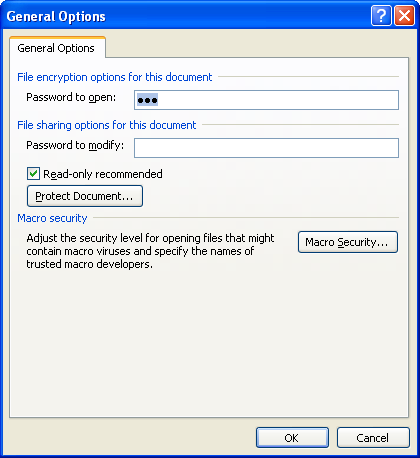
step 5. click tool button and select gernal option
Image result for word 2007 password
      you can see open a new dilogbox and click password to open 

password to modify then click ok button 

again open a new password box in this box write  a comfirm password and 
Image result for word 2007 password
click ok again.

step 5. click save button